


Executive search is a high-stakes, relationship-driven discipline where recruiters need to balance speed with discretion, candidate quality, client communication, and accurate research.
The global executive search market is estimated at about $63.99 billion in 2026 and is projected to reach $103.54 billion by 2031. As leadership searches become more specialised, search firms are also adopting technology to manage candidate relationships, market research, confidential assignments, collaboration, and reporting at scale.
Implementing executive search software is more than purchasing a new recruitment system. A successful rollout requires clear goals, clean recruitment data, well-designed workflows, integrations, user training, security controls, and ongoing measurement.
Whether you are implementing executive search software for the first time or replacing an older executive recruitment system, the objective should be the same: create a reliable system for managing clients, candidates, search assignments, communication, research, reporting, and compliance from one centralised platform.
TL;DR
-
Define goals and requirements: Identify existing workflow challenges, business objectives, stakeholder needs, and measurable implementation goals.
-
Audit and prepare data: Clean duplicate records, standardise candidate and client information, map data fields, and validate records before migration.
-
Configure workflows and permissions: Set up search assignments, candidate pipeline stages, client management, task tracking, reporting, and access controls.
-
Integrate existing tools: Connect essential email, calendar, contact management, and reporting systems, then test data synchronisation and integration reliability.
-
Test before go-live: Validate migrated data, workflows, permissions, integrations, and reports through user acceptance testing and resolve critical issues.
-
Train your team and launch in phases: Provide role-based training, run a pilot, collect feedback, and expand deployment once essential workflows function correctly.
-
Measure and optimise performance: Track user adoption, data quality, assignment progress, time-to-shortlist, and integration reliability against pre-implementation baselines.
-
Avoid common implementation mistakes: Prevent poor data migration, unnecessary workflow customisation, inadequate training, excessive integrations, and premature deployment.
-
Choose software that fits your needs: Evaluate migration support, workflow configuration, integrations, security, reporting, training, and scalability before selecting a platform.
What Is Executive Search Software Implementation?
Executive search software implementation is the process of configuring and deploying a software platform to support the end-to-end executive recruitment process. It includes transferring existing candidate and client data, setting up search workflows, establishing access permissions, integrating business tools, and preparing consultants to use the system effectively.
Unlike a basic recruitment workflow, executive search often involves confidential assignments, senior-level candidate relationships, complex stakeholder requirements, and long-term talent pipelines. The implementation process must account for these specific needs.
A well-planned implementation helps firms establish consistent processes for managing executive search assignments, tracking candidate engagement, maintaining client relationships, and monitoring search progress.
Why Is a Structured Implementation Plan Important?
Implementing executive search software without a clear plan can introduce unnecessary disruption, particularly when a firm manages multiple ongoing search assignments.
A structured approach helps address common challenges such as:
-
Fragmented candidate data: Candidate profiles, contact details, notes, and employment histories may be spread across spreadsheets, inboxes, and separate databases.
-
Inconsistent search workflows: Consultants may use different processes to track research, candidate outreach, interviews, and client feedback.
-
Limited visibility: Search leaders may struggle to understand assignment progress, consultant workloads, and outstanding activities.
-
Data confidentiality: Sensitive candidate and client information requires appropriate access controls and handling procedures.
-
Low user adoption: Consultants may continue using familiar tools if the new system is difficult to understand or does not support their daily activities.
A defined implementation process helps executive search firms address these challenges before they affect day-to-day operations.
How to Implement Executive Search Software in 7 Steps
Step 1: Define Your Implementation Goals and Requirements
Before configuring executive search software, establish what your firm wants to achieve. Start by reviewing existing recruitment processes, identifying operational bottlenecks, and documenting the requirements of consultants, researchers, account managers, and leadership teams.
Consider the following questions:
-
How does your team currently manage executive search assignments?
-
Where are candidate profiles, client records, and communication histories stored?
-
Which activities require repetitive manual work?
-
How do consultants track candidate progress and client feedback?
-
What reporting does management need to monitor search performance?
-
Which confidentiality, access-control, and data-retention requirements apply?
Use the answers to define a clear implementation scope.
For example, a firm may prioritise consolidating candidate records, standardising search stages, improving client relationship management, or gaining better visibility into assignment progress.
Next, assign an implementation owner and identify the stakeholders responsible for approving workflows, preparing data, testing configurations, and training users.
Practical tip: Establish measurable baseline metrics before implementation. These might include time-to-shortlist, duplicate-record rates, candidate record completeness, and the proportion of users actively using the current system. Baselines make it easier to assess the impact of the new platform later.
Step 2: Audit and Prepare Your Executive Search Data
Data preparation is one of the most important parts of executive search software implementation. An existing database may contain duplicate candidate profiles, outdated contact details, inconsistent job titles, incomplete employment histories, or records stored in different formats.
Migrating these records without reviewing them can reproduce existing problems in the new system.
Start by identifying every relevant data source, including spreadsheets, legacy recruitment databases, contact management systems, and other approved repositories.
Then follow these activities:
-
Audit existing records: Identify the types of candidate, client, contact, company, and assignment data that need to be migrated.
-
Remove duplicates: Establish matching rules to identify duplicate profiles while preserving valuable notes and relationship histories.
-
Standardise fields: Use consistent formats for names, job titles, locations, contact details, and other important attributes.
-
Map data fields: Match the fields in the existing system to the corresponding fields in the new executive search platform.
-
Validate data quality: Check mandatory fields, missing information, and inconsistent values before migration.
-
Protect sensitive information: Confirm that data handling, retention, and access practices align with applicable legal and organisational requirements.
Before migrating the complete database, run a test migration using a representative sample of records. Compare the source and destination records to identify missing fields, formatting errors, and other discrepancies.
After the full migration, reconcile record counts and validate critical information such as candidate contact details, client records, assignment histories, and associated notes.
Practical tip: Keep a recoverable copy of the original data and agree on a rollback procedure before the final migration. This provides a safeguard if critical data is missing or incorrectly transferred.
Step 3: Configure Workflows and Access Permissions
Once the data preparation plan is established, configure the software to reflect how your executive search firm operates.
Avoid simply reproducing every existing process. Review which workflows are effective, which create unnecessary work, and which should be standardised across the organisation.
Depending on the platform's capabilities, configuration may include:
-
Search assignment management: Define how assignments are created, assigned to consultants, prioritised, and monitored.
-
Candidate pipeline stages: Establish consistent stages for research, initial contact, screening, interviews, shortlist preparation, and placement where applicable.
-
Candidate relationship management: Configure fields and activities that help consultants maintain candidate histories, communication records, and relationship context.
-
Client management: Organise client profiles, stakeholder contacts, meeting notes, and assignment-related information.
-
Task and activity management: Define reminders, follow-up activities, deadlines, and responsibility for outstanding actions.
-
Reporting and dashboards: Configure views that help managers monitor assignment progress, workload, and operational performance.
-
Access permissions: Establish appropriate access to confidential candidate profiles, client information, and sensitive search assignments.
Permissions deserve particular attention in executive search because firms may handle confidential leadership appointments and sensitive client information.
Use role-based access where available, and test permissions using representative user accounts rather than assuming that the configuration is correct.
Practical tip: Start with the workflows your consultants use most frequently. Introduce additional custom fields and automation only when they address a clear operational requirement.
Step 4: Integrate Your Existing Recruitment Tools
Executive search consultants often work across email, calendars, communication tools, document systems, and other business applications. Integrations can help reduce repetitive data entry and keep relevant information accessible within the executive search platform.
Before configuring integrations, identify which tools are essential to your team's daily work.
Evaluate the following areas:
-
Email integration: Determine whether consultants can manage relevant communications and preserve appropriate correspondence histories.
-
Calendar integration: Check whether meetings, interviews, and follow-up activities can be coordinated efficiently.
-
Contact and data integrations: Identify approved sources that can enrich or synchronise candidate and client information.
-
Reporting integrations: Establish whether operational data needs to be shared with business intelligence or reporting systems.
-
API connectivity: Assess whether custom integrations are required to connect existing business applications.
Not every firm needs every integration. Prioritise integrations according to their business value, security requirements, technical feasibility, and maintenance needs.
After configuration, test each integration using realistic scenarios. Check whether data is transferred correctly, duplicate records are avoided, permissions are respected, and errors can be identified and resolved.
Document integration ownership and establish a process for handling synchronisation failures or changes to connected systems.
Step 5: Test the System Before Go-Live
Before making the new platform available to the entire team, conduct structured testing to confirm that the system supports the agreed requirements.
Testing should cover more than whether users can log in. It should verify that data, workflows, permissions, integrations, and reporting behave as expected.
A practical testing process includes:
-
Data validation: Confirm that candidate profiles, client records, assignment details, and important historical information have transferred correctly.
-
Workflow testing: Create sample assignments and move candidates through the configured stages.
-
Permission testing: Verify that users can access the information required for their roles without receiving unauthorised access.
-
Integration testing: Confirm that connected tools exchange information correctly and handle errors appropriately.
-
Reporting validation: Compare sample reports with source records to ensure that the results are accurate.
-
User acceptance testing: Ask representative consultants and researchers to complete realistic tasks and provide feedback.
-
Issue resolution: Document defects, assign owners, and retest critical issues before approving launch.
For example, a consultant should be able to locate a candidate, review the relevant relationship history, associate the candidate with an appropriate assignment, record an interaction, and update the candidate's status without losing important information.
Define acceptance criteria before testing begins. Critical failures involving data integrity, confidentiality, or essential workflows should be resolved before the system goes live.
Step 6: Train Your Team and Launch in Phases
Even a well-configured platform may deliver limited value if consultants do not understand how to use it in their daily work.
Training should therefore focus on practical tasks rather than simply demonstrating the software's features.
Consider providing role-based training for:
-
Executive search consultants: Managing assignments, updating candidate pipelines, recording interactions, and coordinating follow-ups.
-
Researchers: Maintaining candidate records, documenting research, and supporting candidate identification.
-
Account managers: Managing client relationships, reviewing assignment activity, and coordinating stakeholder communication.
-
Team leaders: Monitoring search progress, reviewing workload, and interpreting operational reports.
-
System administrators: Managing configuration, user permissions, support requests, and ongoing maintenance.
Provide concise documentation, practical demonstrations, and opportunities for users to practise common workflows.
A phased rollout can reduce disruption. Start with a pilot group or a limited set of assignments, gather feedback, resolve usability issues, and expand deployment when the essential processes are working reliably.
Appoint internal champions who can help colleagues resolve routine questions and communicate recurring problems to the implementation owner.
Practical tip: Explain how the new system will make specific tasks easier. Demonstrating how to retrieve a candidate's history or monitor an active assignment is often more useful than presenting a long list of features.
Step 7: Measure Adoption and Optimise Performance
Implementation does not end when the software goes live. Ongoing evaluation helps determine whether the system is being adopted and whether it is supporting the firm's operational objectives.
Review performance against the baseline metrics established during the planning stage.
Useful measures include:
| Metrics | What it measures | Why it matters |
| User adoption rate | Proportion of intended users actively using the system | Identifies adoption and training gaps |
| Data migration accuracy | Accuracy and completeness of migrated records | Helps establish confidence in the new database |
| Record completeness | Percentage of records containing required information | Supports reliable search, reporting, and relationship management |
| Time-to-shortlist | Time taken to produce an agreed candidate shortlist | Helps assess the efficiency of the search process |
| Assignment progress | Progress against defined search stages and milestones | Helps identify bottlenecks and delayed activities |
| Integration reliability | Consistency of data exchange between connected systems | Highlights technical issues and manual workarounds |
| User feedback | Reported usability issues and workflow challenges | Identifies opportunities for improvement |
Interpret the results in context. For example, time-to-shortlist may vary by role seniority, market availability, client expectations, and search complexity.
Schedule regular reviews with consultants and managers to discuss performance, identify recurring problems, and prioritise improvements.
Use the findings to refine workflows, improve training, adjust reporting, and review configuration decisions as the firm's requirements evolve.
Executive Search Software Implementation Checklist
Use this checklist to confirm that the essential implementation activities have been addressed.
Before implementation
-
Define business objectives and success metrics.
-
Document existing workflows and system requirements.
-
Assign implementation ownership and stakeholder responsibilities.
-
Audit existing candidate, client, and assignment data.
-
Identify required integrations and confidentiality controls.
During implementation
-
Clean and map existing data.
-
Test migration with a representative sample.
-
Configure search workflows and access permissions.
-
Set up and validate required integrations.
-
Prepare dashboards, reports, and user documentation.
-
Conduct functional testing and user acceptance testing.
Before go-live
-
Resolve critical defects.
-
Validate migrated records and permissions.
-
Complete role-based team training.
-
Confirm business-owner approval against acceptance criteria.
-
Establish support procedures and a rollback plan.
After go-live
-
Monitor adoption and data quality.
-
Collect feedback from consultants and researchers.
-
Review operational metrics against the baseline.
-
Resolve recurring workflow and integration issues.
-
Document improvements and assign responsibility for follow-up actions.
Completing these activities helps ensure that the implementation is planned, tested, and evaluated rather than treated as a simple software deployment.

Common Executive Search Software Implementation Mistakes to Avoid
Several avoidable mistakes can make implementation more complicated than necessary.
Migrating Data Without Cleaning It
Transferring duplicate, incomplete, or outdated records can reduce confidence in the new database. Audit and clean the data before migration, and validate it after the transfer.
Reproducing Every Existing Workflow
Existing processes may include unnecessary steps or inconsistent practices. Review them before configuration and standardise where appropriate.
Overlooking Confidentiality and Permissions
Executive search firms may handle sensitive candidate and client information. Define access requirements early and test permissions before launch.
Integrating Too Many Tools at Once
Attempting to connect every application during the initial rollout can increase complexity and make troubleshooting more difficult. Start with essential integrations and expand when the core system is stable.
Providing Insufficient Training
A single product demonstration may not prepare users for real assignments. Provide role-specific training, practical exercises, documentation, and ongoing support.
Measuring Success Only by Go-Live
A successful deployment does not automatically mean that the software is being used effectively. Monitor adoption, data quality, workflow performance, and user feedback after launch.
How to Choose Executive Search Software That Supports Implementation
The implementation process also depends on whether the selected platform meets the firm's technical and operational requirements.
Before committing to a solution, assess the following capabilities:
-
Data migration support: Determine how existing candidate, client, and assignment records can be transferred and validated.
-
Workflow configuration: Check whether the system can accommodate your search processes without excessive custom development.
-
Integration capabilities: Confirm compatibility with the tools your team needs and understand any API or integration limitations.
-
Confidentiality and access controls: Evaluate permissions, data handling, auditability, and other relevant security requirements.
-
Reporting and analytics: Check whether the platform can provide the operational information needed to measure performance.
-
Training and support: Understand what onboarding resources, implementation assistance, and ongoing support are available.
-
Scalability: Consider whether the system can support additional consultants, clients, assignments, and business requirements as the firm grows.
Compare these requirements against your implementation priorities rather than selecting a platform based solely on its feature list.
A platform that aligns with your workflows, data requirements, and team capabilities can make the transition more manageable.

How to Maximise ROI from Executive Search Software
After buying the software, it’s your duty to squeeze every last drop of potential from that executive search software you've invested in.
Like any powerful tool, it's all about how you wield it.
Follow these best practices to get the most out of your executive search software.
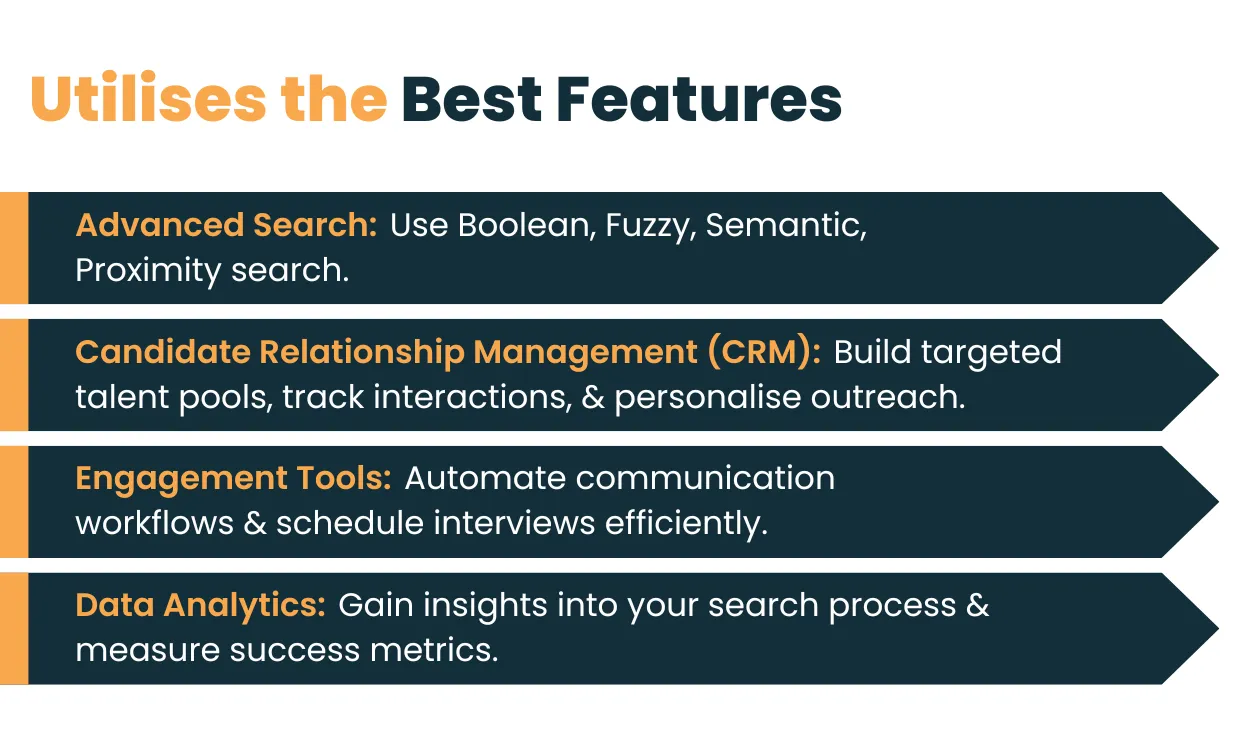
1. Utilises the Best Features
2. Prioritise Quality Over Quantity: Don't get stuck by a massive candidate pool. Use the software's filtering to identify potential candidates. Make sure they possess the right skills, qualifications, cultural fit, and experience tailored to your client's needs.
3. Foster Collaboration: Executive search is often a team effort. Utilise the platform's team collaboration tools to share candidate profiles, notes, and feedback seamlessly among internal teams and clients.
4. Invest in User Adoption: Ensure your team receives proper training on the software. Regular training sessions and encouraging exploration will help them leverage the software's full potential.
5. Measure and Refine: Track key metrics like time-to-fill, quality of hire, and cost-per-hire. Use these insights to refine your search strategies and optimise your software usage.
6. Leverage AI and Machine Learning: Many modern software solutions include AI capabilities that can help you analyse resumes, assess candidate compatibility, and predict hiring success. Utilising these features can significantly reduce the time spent on manual tasks.
By following these steps, you can turn your executive search software into a powerful tool.
How iSmartRecruit Can Support Executive Search Software Implementation
iSmartRecruit provides executive search tool designed to support executive search and recruitment workflows. For firms evaluating a new platform, the implementation discussion should focus on how the software can fit existing processes, support candidate and client relationship management, and improve visibility into search assignments.
When evaluating iSmartRecruit, consider how its available capabilities align with your requirements for:
-
Candidate and client relationship management.
-
Executive search assignment and pipeline management.
-
Workflow configuration and activity tracking.
-
Integration with the tools your consultants use.
-
Reporting and operational visibility.
-
User onboarding and ongoing support.
The appropriate configuration will depend on your firm's size, existing systems, data quality, and implementation objectives. Discuss these requirements with the iSmartRecruit team before finalising your implementation plan.
Explore our comprehensive Executive Search Guide to learn more about executive search processes, strategies, and best practices.

Conclusion
Implementing executive search software successfully requires a structured approach that connects business objectives, data preparation, workflow configuration, integrations, testing, training, and ongoing evaluation.
By following these seven steps, executive search firms can plan a more controlled transition, reduce avoidable implementation issues, and establish a stronger foundation for managing candidate relationships and search assignments.
The key is to treat implementation as an operational improvement project rather than a software installation. Define measurable goals, involve the people who will use the platform, validate critical workflows, and continue refining the system after launch.
Frequently Asked Questions (FAQs)
1. What is the first step in implementing executive search software?
The first step is defining your firm's recruitment goals, current workflow bottlenecks, integration requirements, and stakeholder expectations. A clear plan built around these inputs helps firms choose the right platform and avoid low adoption after launch.
2. How long does it take to implement executive search software?
Most firms complete implementation within a few weeks to a few months, depending on data migration complexity, the number of integrations required, and how much customisation and training the rollout involves.
3. What should firms evaluate before choosing executive search software?
Firms should evaluate integration compatibility, customisation options, mobile access, candidate database quality, training and support, and data security standards, including GDPR compliance for firms operating in or with the EU.
4. Is AI important in executive search software in 2026?
Yes. Recruiting is now the most common AI use case within HR functions, and executive search firms using AI-assisted sourcing and screening report faster time-to-fill and more consistent candidate matching than firms relying on manual research alone.
5. How much does executive search software cost?
Pricing ranges from roughly $50 to $300 per seat per month for platforms with published pricing, up to $30,000 or more annually for enterprise-grade systems. Many vendors require a sales conversation rather than publishing rates, so budgeting should account for procurement time.
6. How does iSmartRecruit support executive search firms?
iSmartRecruit provides AI-driven sourcing and analytics, a centralised candidate and client management system, and integration with existing HR technology, helping firms run faster, more targeted executive searches.
7. What are the best practices for a smooth executive search software rollout?
Best practices include phased deployment, role-based training, secure and validated data migration, integration testing before full go-live, and ongoing performance tracking using metrics like time-to-fill and interview-to-placement ratio.
About the Author