Recruitment teams handle hundreds of applications, many open roles and a long list of stakeholders, often across email, spreadsheets and job boards. An applicant tracking system (ATS) brings that work into one place.
This guide covers what an ATS is, how it works, the features that matter, the benefits, how an ATS differs from a recruiting CRM, and what staffing agencies, executive search firms and corporate hiring teams should look for when choosing one.
TL;DR
- An applicant tracking system (ATS) is software that collects, organises and tracks job applications and candidate data from job posting to hire.
- Core functions include job posting, resume parsing, candidate search, pipeline tracking, interview scheduling, collaboration and reporting.
- Staffing agencies and executive search firms usually need ATS and recruiting CRM capabilities together. Corporate teams often prioritise hiring manager collaboration, a career site and integrations.
- AI features can speed up screening and matching, but their output needs human review.
- Before choosing, check features, pricing model, compliance, support and data migration, then test shortlisted vendors through a demo or trial.
Are you a hiring professional who struggles to streamline and manage your entire recruitment process efficiently? Then, get ready to discover the perfect solution to overcome all your recruitment hurdles.
Introducing Applicant Tracking System (ATS), your gateway to quickly discover, attract and hire the brightest minds in the job market.
Now, you must be wondering why ATS has recently become the talk of the town in the recruitment landscape.
How will ATS solve all your hiring problems?
Why is the importance of an ATS growing rapidly?
To solve all the doubts you have, we conducted deep research and prepared a comprehensive solution guide on the Applicant Tracking System.
In this guide, you will get everything you need to know before buying an ATS. So, what are you waiting for? Let’s streamline your end-to-end hiring by diving deep into the sea of knowledge that enables you to get the maximum out of using ATS.
What is an Applicant Tracking System (ATS)?
An applicant tracking system (ATS) is software that helps recruiters and hiring teams collect, organise and track job applications and candidate information from job posting to hire. ATS stands for applicant tracking system. Some vendors call it a candidate tracking system.
Basically, ATS software serves as a digital tool for collecting, organising, and tracking job applications and candidate information. It is also known as the Candidate Tracking System.
Think of an ATS as the system of record for your hiring: every applicant, note, interview and decision lives in one searchable place.
How Has the ATS Evolved?
Understanding where ATS came from helps explain why modern platforms are so capable.
Traditional Recruitment: Before the digital era, recruitment was mainly dependent on paper-based resumes and manual record-keeping, which was incredibly time-consuming.
Shift to Digital Databases: Recruitment professionals moved toward online databases to save candidate data after the invention of computers.
Early ATS software (1990s): The first applicant tracking systems stored, searched and managed resumes more efficiently, typically on a company’s own servers.
Web-Based ATS: The ATS platform became popular in the early 2000s as it enhanced accessibility, collaboration, and scalability, and recruiters and HR can access it from any location with an internet connection.
ATS Integration with Job Boards: Slowly, online job boards and career websites became mainstream. ATS Integration with these online platforms enabled seamless job posting and candidate application processing.
Advanced Search and Matching: Modern ATS systems include advanced features to parse and match resumes to open jobs based on keywords, skills, and other important criteria, streamlining the candidate selection process.
Mobile-friendly ATS: ATS platforms are adapted to provide mobile-accessible interfaces, which make it easier for recruitment professionals to access and manage candidate data on the go.
How Does Applicant Tracking Systems Work?
ATS systems are designed to help recruiters and HR manage recruitment from start to finish. Let’s understand how ATS software streamlines and automates recruitment workflow.
Here is a step-by-step infographic of ATS functions.

Easy Job Posting
Recruiters can create job descriptions within the ATS by specifying the job title, description, requirements, and other key details. Once it is done, it facilitates the automatic posting of job openings on various job boards, career websites, and social media platforms with just a single click.
Application Submission
Candidates apply through the company's career portal or a job board. Their submissions are automatically captured and stored in the ATS candidate database.
Filtering Resumes
The ATS extracts key information from each application, including contact details, work history, education, and skills, using algorithms and natural language processing (NLP). This creates a structured, searchable profile for every candidate.
Knockout Screening
ATS automatically filters out candidates who do not meet predefined essential criteria, such as specific qualifications, experience, or skills.
By using this feature, recruiters can set questions often checkboxes or short answers, that help eliminate any candidate who is not a right fit. If an applicant doesn’t meet your organisation’s standards, then their resume is automatically set aside.
This way, you can efficiently narrow down the talent pool to those who are most likely to be a good fit for the role.
Store in the Database
The parsed candidate data is then stored in a candidate database, which is a searchable repository of applicants. It makes it easy for recruiters and hiring managers to access and manage candidate information efficiently.
Scheduling Interviews
ATS platform integrates with calendars to schedule interviews and send invitation links to both candidates and hiring managers. This is how the software allows recruiters to coordinate interview times.
Applicant Tracking
Tracking the journey of every candidate becomes a piece of cake with ATS in your tech stack. From initial application to final hiring decision, it tracks the progress of each candidate through the visual hiring pipeline. This tracking makes sure that no candidate falls through the cracks and helps TA teams stay organised.
Manage Candidate Communication
Applicant tracking systems streamline effective communication between recruiters and candidates. At different stages of the process, recruiters can send automated emails, updates, and interview invitations. It ensures that candidates stay informed and engaged.
Enable Smooth Team Collaboration
ATS recruiting software enables multiple team members to collaborate smoothly during the hiring process. Recruiters, hiring managers, and other stakeholders can review candidate profiles, leave their feedback, and make informed decisions within the ATS interface.
Compliance Management
ATS software includes features to assist with compliance. By managing documents like offer letters and consent forms, the software aligns with legal requirements in the hiring process.
Top 10 Crucial Features in ATS Software You Must Need
These are the features that matter most when comparing ATS software. Not every team needs all of them, so rank them against your own workflow.
Here’s a list of the most important technical and non-technical features:
1. Advanced Database Search Capabilities
- Searching for complex queries for candidates will get easier using multiple parameters such as skills, experience, and location.
- It offers a full-text search for a complete scan of resumes and cover letters.
- It allows you to create custom filters for specific recruitment needs.
2. Customisable Workflow
- This feature allows you to create custom workflows and recruitment stages to fit your unique hiring needs.
- You can add, remove and modify the workflow steps (For instance: screening, interviewing, onboarding).
- Create custom templates for emails, assessment forms, and job postings.
3. AI Candidate and Job Matching
- This feature utilises AI algorithms to match candidates with job openings and jobs against candidates based on skills, experience, and other relevant criteria.
- The AI profile and job matching feature analyses job descriptions and candidate profiles to identify the best matches.
- Get a ranked list of candidates for each job opening and save time for your team in candidate screening.
4. Recruitment Marketing
- This feature helps you strengthen your employer branding via customisable career site integration and one-click job posting functions.
- You can target specific talent pools using tailored marketing campaigns and social media recruitment strategies.
- Leverage email marketing functionalities to nurture relationships with potential candidates.
- Also, get insightful analytics to understand the effectiveness of different recruitment marketing strategies.
- By using this feature, you can engage passive candidates by creating a talent community and keeping them informed about relevant opportunities in your organisation.
5. End-to-end Interview Management
- Integrate with calendars (such as Google Calendar or Outlook) and schedule interviews by coordinating available times between candidates and interviewers. This way, you can prevent scheduling conflicts.
- This feature allows easy rescheduling and cancellation with automatic notification updates to relevant parties.
- It comes with functionality to create and manage interview agendas and checklists to ensure structured and effective interviews.
- The integration with video conferencing platforms supports virtual interview setup.
6. Collaboration Tools
- The team collaboration feature facilitates real-time communication and collaboration between hiring managers and recruitment team members.
- It provides shared platforms for reviewing and commenting on candidate profiles, ensuring a unified team assessment.
- Hiring managers can easily delegate and track the tasks of their recruitment team.
- The feature offers shared calendars and scheduling tools to coordinate interviews and meetings efficiently.
- You can share, edit, and streamline the creation of job descriptions and interview scripts.
7. Reporting and Analytics
- Create real-time recruitment analytics reports on different aspects of your recruitment process, such as time-to-hire, quality-of-hire and cost-per-hire).
- Leverage customisable dashboards to track Key Performance Indicators (Recruitment KPIs) relevant to your hiring process.
- Get practical insights into candidate demographics which will help you understand the diversity of the applicant pool you created.
- This feature provides more advanced functionality like predictive analytics to understand your future hiring needs by analysing historical data analysis.
8. Visual Recruitment Pipeline
- It offers a dynamic, visual representation of the recruitment process and maps out each stage from application to hire.
- This way, your recruiters and hiring managers can quickly see where candidates are in the hiring pipeline.
- You can even enable drag-and-drop functionality for moving candidates between different stages and make updates more efficient.
- Glance at the health of the pipeline, such as how many candidates are at which stage and what the bottlenecks are in the process.
- As a result, you can identify high-potential candidates and prioritise tasks.
9. Integration Capabilities
- Seamless integration of an ATS with other HR software systems like payroll, onboarding, and performance management is important for smooth data flow.
- It integrates with job boards and social media platforms to simplify job postings and attract a broader range of candidates.
- ATS will sync with email and calendar applications for efficient scheduling and smooth communication.
- This function supports the integration of advanced tools like AI-based analytics or chatbots for improved recruitment processes and candidate engagement.
10. Compatible with Mobile Devices
- You must check that the ATS provides a mobile-responsive interface to ensure a seamless and user-friendly experience on smaller screens.
- It allows your recruiters and candidates to engage with the system anytime, anywhere.
- Enables instant notifications and updates on mobile devices, so recruiters and candidates stay informed in real time.
- With mobile-friendly ATS software, it becomes easier for candidates to apply for jobs directly from their devices.
11. Centralisation of Data
- Data centralisation consolidates all recruitment-related data into a single, accessible platform.
- It provides a unified database for candidate profiles, resumes, interview notes, and communication history.
- This way, it enables easy retrieval and management of candidate information, improving efficiency.
So, these are the features you must look for to make the recruitment process more efficient, accurate, and user-friendly. You can enhance any organisation's hiring process by selecting an ATS with the features we mentioned above. The Standard Workflow section follows naturally. Keep the 11 feature blocks, and fix the stray
The Standard ATS Recruitment Workflow
The utilisation of recruitment tracking software is escalating too fast due to its paramount features and attributes that ease the activities of the recruiter and hiring manager. Most applications move through the same stages, although names vary between organisations and vendors.

Generally, all arriving applications go through the recruitment workflow that contains many stages, as given below.
- Screening: The initial review, including phone screens and pre-screening questions.
- Submission: The recruiter sends shortlisted candidates to the hiring manager, or to the client in an agency, for review.
- Interview: The hiring manager or client interviews the candidate, often in several rounds.
- Offer: The employer makes the job offer.
- Hiring and joining: The candidate accepts and confirms a start date.
- Onboarding: Joining formalities and induction begin.
Why do recruiters need an Applicant Tracking System?
The global ATS market was valued at $17.22 billion in 2025 and is projected to grow to $34.83 billion by 2034, registering a CAGR of 8.2%. This level of sustained investment reflects just how central ATS has become to competitive hiring.
Recruiters compete for the same candidates, and delays or lost applications often mean losing them. Without an ATS, applications sit in inboxes and spreadsheets, interview notes are scattered and nobody has a reliable view of where each candidate stands. Moreover, a recruiter goes through various types of hiring challenges to hire the right one.
If you wish to crack this evil situation, As a good recruiter, ATS can be one of the best options. An ATS gives the whole team one shared record, so fewer candidates are overlooked and hiring managers can see progress without chasing updates.
What are the Benefits of the Applicant Tracking System?
One of the popular proverbs is: Old ways won't open new doors. Exactly, you need to upgrade your business process to be in the race and lead the market.
There are a bunch of benefits you get when you adopt an online tracking system for your business instead of daily manual recruiting; it boosts business productivity.
A good ATS changes how a recruitment team works day to day. These are the main benefits.
Save time-to-hire
In the hiring process, an ATS automates repetitive steps such as multiposting jobs, parsing resumes, scheduling interviews and sending status emails, so recruiters spend more time talking to candidates and less on admin.
Reduce the cost per hire
Faster hiring and less manual work can lower cost per hire, especially when you reuse past applicants instead of paying for new advertising or agency fees on every role. The savings depend on your hiring volume, current tools and pricing.
Enhance the quality of hire
According to the research, 78.3% of ATS users say it has improved the quality of candidates they hire. This happens because of some significant features of applicant tracking software such as the pre-employment assessment test feature, automatic profile matching, candidate matching feature, overall scorecard, and many more.
The fact is that top talent has stayed in the market only for the last 10 days; speeding up the hiring process through applicant tracking software will help the employer to grab high-quality talent easily.
Boost the employer brand
Employer branding is the impression of your product on the market. Through applicant tracking software, you can enhance employer branding. ATS provides continuous engagement with candidates throughout the hiring process; the self-service portal builds and maintains the relationship with candidates and, moreover, eases the process of applying for jobs.
Our research revealed that 75.1% of candidates say that employer brand and culture are important when applying for a job. Thus, well-rated employer branding automatically attracts more top talent.
Increases positive candidate experience
Whether the candidate gets hired or not, the impression of the recruitment process on each candidate is valuable, also in terms of profit. The recruiting approach using ATS will serve the best discrimination experience for the candidates.
For instance, regular updates to the candidate, the status of the application, chatbot, self-interview scheduling, automated email, and so on activities via ATS improve the experience of the candidates.
According to the research, 80 to 90% of the candidates change their minds concerning the company after experiencing a bad recruitment process.
Streamline the recruitment process
An ATS replaces separate spreadsheets, inboxes and calendars with one record of every candidate, role and conversation. Handovers between recruiters become easier and reporting becomes more reliable.
Moreover, it amplifies the accuracy rate along with a faster speed of hiring. Instead of adopting multiple software for different processes, everything is present in one place when you choose ATS. This makes the hiring process easy to manage.
Online Applicant Tracking System Features
Recruiters should choose a technology option over a manual process that automates the recruiting process with no human mistakes. It also increases the efficiency of a particular recruiter.
Thus, the main purpose of the recruiter while adopting applicant track ing software is to automate the hiring process and organise the candidate database due to some common and extraordinary features that make things happen.
Different ATS provide a variety of features that often include the following:
Career page hosting
The career page is where companies can display an open position on their website. And many applicant tracking systems permit users to do this directly from the ATS.
ATS makes the entire process simpler, like an easy setup, and provides spaces to add photos, descriptions, logos, share buttons, and many more per the recruitment marketing requirement.
A heap of job boards
Posting open positions on various job boards automatically increases the reach and amplifies the possibility of finding the right talent.
There are lots of recruitment sites available such as Indeed, Monster, CareerBuilder, and so on, that have a partnership with ATS. Thus, when you create a new job, you can post it immediately on different sites with just one click.

Interview scheduling management
Scheduling an interview is a hassle process. ATS with an automated interview schedule make the process quicker and uncomplicated.
Many ATS provide self-interview scheduling where candidates can fix the date and time according to their convenience. Different calendar plugins like Outlook and Google add benefits to it. This interview scheduling feature saves employers, recruiters, and candidates time.
Reporting and analytics
Every recruiter and hiring manager wants to know about the recruitment process's overall performance to improve the hiring approach. Almost every applicant tracking system offers the feature of reporting and analytics, which provides feedback to recruiters about the whole recruitment process. This feature provides meaningful insight to recruiters in a visual form.
User-friendly reports and analytics are some of the great features of recruitment management. Applicant tracking systems provide interactive and real-time reports and analytics that are customisable and easy to access.
Automation in email communication
Candidate engagement has become a more prominent part of the recruitment process than ever. Manual communication with more than 100 applicants is time-consuming.
Using online applicant tracking software, recruiters and hiring managers can send mass emails to all candidates simultaneously.
Automated email helps businesses engage with candidates frequently, and communication provides a good candidate experience and enhances employer branding as well.
Resume parser
It is another significant and common feature that each applicant tracking system offers. The great Resume parsing feature allows candidates to apply faster as well as create a well-organized candidate database. This feature also permits recruiters to import candidates' resumes from different platforms such as LinkedIn, Monster, Indeed, and many more.
Mobile-friendly Applicant Tracking System
Mobile has become a global device. Nearly every job seeker uses a mobile phone to apply for a job. As per the research, 77% of job applications are done on mobile phones. The much easier use of ATS on mobile devices, the more application recruiters will get as candidates complete the entire process of application. This is the paramount feature for the employer and also for the candidates.
What to Check Before Choosing an ATS?
Before you shortlist vendors, check these five areas. They matter whether you run a small recruitment business or a large hiring team. Whether a small business or startup, you should choose your Recruitment Software or Applicant Tracking software based on the following aspects.
- Features: Match must-have features to your actual workflow rather than the longest feature list.
- Pricing model: Check whether pricing is per user, per job or flat, what is included, and the contract length and renewal terms. See iSmartRecruit pricing for how one vendor presents it.
- Compliance: Confirm consent management, retention controls and how the vendor handles candidate data. See the GDPR section below.
- Support: Ask about onboarding help, training and support hours in your time zone.
- Data migration: Ask how existing candidate records are imported and what is included. See data migration.
Also consider deployment. Most ATS platforms are cloud-based, and on-premise options exist for organisations with specific data requirements.
What is the Role of AI in the Online Applicant Tracking System?
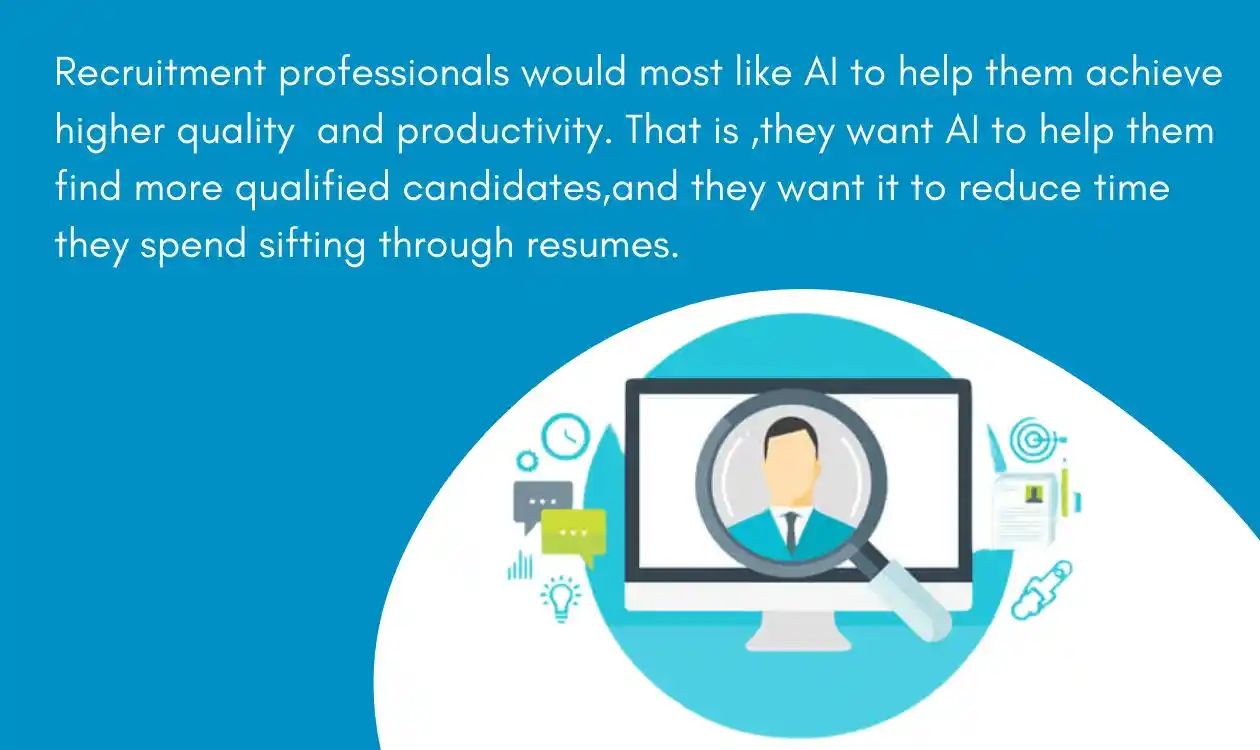
Many modern ATS platforms include AI features that reduce manual screening and administration. They can rank candidates against a job, extract details from resumes and answer routine candidate questions.
As per the research, it has been proven that normally it takes 17 minutes to apply manually, but with AI, it takes only 3 minutes. At the same time, approximately 92% of candidates feel disadvantaged by automated recruiting.
These tools support recruiters. They do not replace judgement, and their output should be reviewed, especially when it affects who progresses. Our guide to AI bias in hiring covers the risks to watch for.
The following areas are where AI plays a pivotal role in the online applicant tracking system.
Matching Profiles
AI can pre-screen incoming CVs and highlight the most relevant profiles, so recruiters do not read every one.
Matching Jobs
Similar to a matching profile, AI can also help you to identify the best matching job for the candidates.
Resume Parser
AI-assisted resume parsing extracts contact details, work history, education and skills into a structured profile. By using AI algorithms and techniques, you can enhance your parser to a great extent.
Recruitment Chatbot
A chatbot can answer routine questions, share application status and collect screening answers at any hour. Also, Recruitment Chatbot provides other features such as candidate sourcing, applicant pre-screening, giving application status to candidates, and improving the candidate experience.
ATS for Recruitment Agencies, Executive Search Firms and Corporate Teams
An ATS does not look the same for every buyer. The right fit depends on who you recruit for and how you earn revenue.
| Types | Corporate talent acquisition | Staffing and recruitment agencies | Executive search firms |
| Main focus | Filling internal roles with hiring manager input | Filling client roles quickly across many clients | Confidential, relationship-led searches for senior roles |
| What the ATS must handle | Career site, application volume, hiring manager feedback, HRIS integration | Client and job order management, candidate submissions to clients, several pipelines at once | Search project tracking, research notes, discreet client reporting |
| Why a CRM matters | Talent pools of strong past applicants | Client and candidate relationships alongside placements | Years of relationship history, not only active searches |
| Compliance focus | Candidate consent, retention and records | Consent across many clients | Confidential candidate and client data |
Startups, small businesses and freelance recruiters usually need a simpler setup: job posting, candidate tracking and a clear pipeline, without enterprise complexity.
For more on specialist needs, see our guides to recruiting CRM for agencies and executive search software.
ATS vs recruiting CRM
An ATS manages applicants and jobs. A recruiting CRM manages relationships with candidates and clients, including people who have not applied. Agencies and executive search firms usually need both, either in one platform or through integrated tools. Corporate teams often start with an ATS and add CRM features for talent pools. See how a recruiting CRM works alongside an ATS.
How to Win an Applicant Tracking System?
The applicant tracking system parses the resumes based on the algorithm. To pass the ATS and reach the level of interview, candidates should write a resume well-mannered. Thus, there is no such trick to beat the applicant tracking system.

Here are some quick pieces of advice to beat applicant tracking systems.
-
The job of ATS is to read the content of the resume and make a comparison with the job description to find the best match. Hence, tailor your CV with a job description whenever you apply for any job.
-
The applicant tracking system considers the headings to navigate the resumes. This is to ensure that information got parsed correctly. Therefore, use a simple heading title that ATS can easily recognize.
-
Don't try to confuse the applicant tracking system by serving too fancy a resume. Keep everything simple inside the resume.
-
ATS matches the resume based on keywords. Hence, use both long-form and initialism versions of keywords, i.e., MCA as well as Master of Computer Applications.
-
Never use the table, column, or any type of graphic, cause often the result is an error during the parsing.
-
Always use the traditional type of font in a resume like Helvetica, Garamond, or Georgia.
-
Try to save the resume in a PDF file format.
How to Implement an ATS Successfully
Implementing an applicant tracking system is a major decision, and it will be successful if the right methods or steps are followed while implementing it.
The following could be the right steps to implement. Identify your current and potential future business requirements. The following are the key steps to be followed to implement your ATS.
-
Prepare a must-have feature list and a good-to-have feature list.
-
List of vendor-related criteria like support hours, office location, etc.
-
Set your budget, the number of users, and the tentative start date.
-
Create a list and then shortlist vendors using the following options.
-
Perform a search on Google with relevant keywords.
-
Visit review platforms like Capterra, G2 Crowd, GetApp, etc.
-
Take reference from your network, which has a similar system.
-
Post an advertisement on social media saying you are looking for an ATS.
-
-
Take demos or trials based on your preference.
-
A trial is best if you wish to explore the system on your own and have enough time to explore the system.
-
A demo is best if you want to see the overall system and discuss your questions. It is also the perfect choice if you have limited time for software evaluation.
-
If your vendor list is big, you can take demos and go for the trial based on shortlisted ATS.
-
A final discussion with the finalized vendor. Price negotiation in case the price is not within the budget.
-
Confirm the order, sign the contract, and get access to the system.
-
User onboarding and team training.
Who can choose an Applicant Tracking System?
Any person or company who is looking for a resource to decrease the workload and increase the efficiency of the work of their team should try the applicant tracking system.
Overall, the following types of businesses may go for ATS:
- Corporate HR/hiring managers
- Staffing companies
- Startup companies
- Recruiting Companies
- Headhunting companies
- Executive search companies
- Freelance recruiters
GDPR and ATS Compliance
The GDPR is the EU’s data protection regulation. It applies to organisations that handle the personal data of people in the EU, wherever the organisation is based. The UK has its own version, UK GDPR, alongside the Data Protection Act. Because an ATS stores personal data about candidates, your system needs to support compliance.
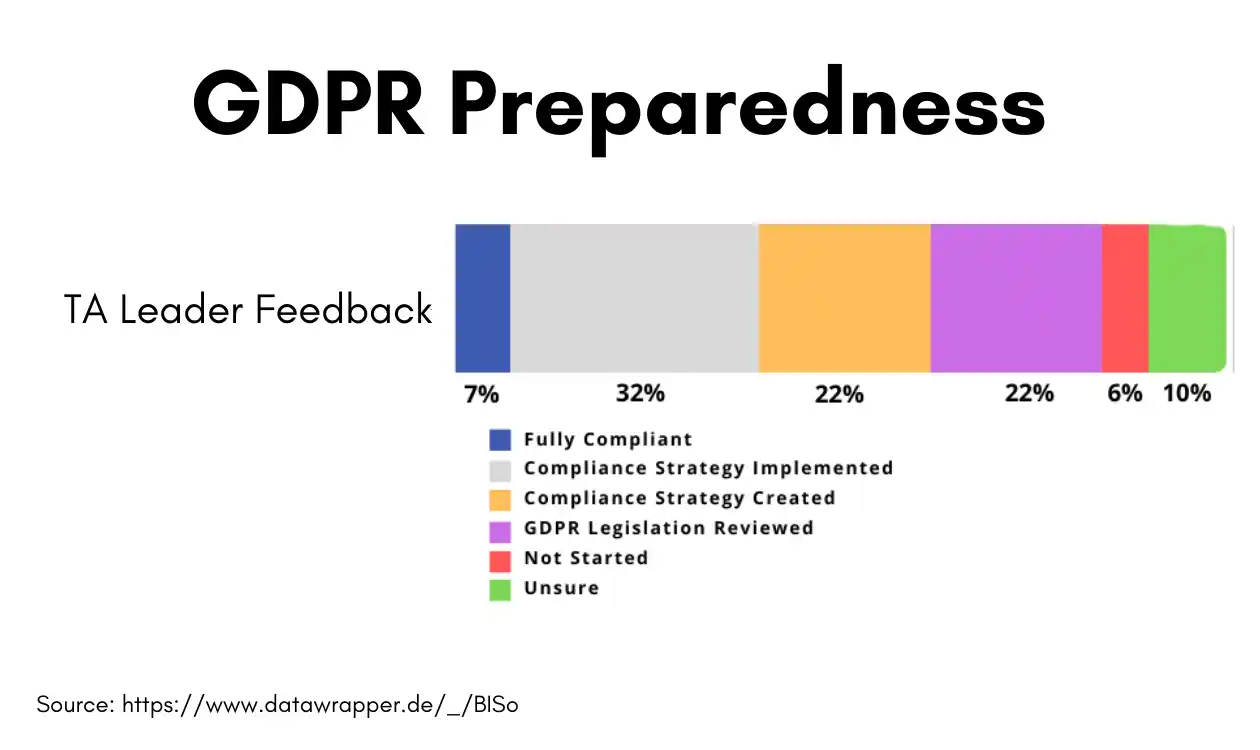
Here are a few key functions of applicant tracking systems that should be included to meet GDPR compliance.
-
Send consent requests to candidates
-
Consent history management
-
Allow the candidate to download their information
-
Allow the candidate to send a request for erasure
-
Consent expiry tracking
-
Show and agree to terms and conditions before application submission
Every applicant tracking system understands the value of a data processor. The primary goal of the applicant tracking system is to provide technology for handling the hiring process with a proper data processor and collector.
Conclusion
An applicant tracking system gives recruitment teams one reliable record of every candidate, job and decision. The right choice depends on who you recruit for. Agencies and executive search firms usually need ATS and CRM capabilities together, while corporate teams may put hiring manager collaboration, a career site and integrations first.
Shortlist vendors against your must-have features, test them on real workflows through a demo or trial, and check compliance, support and data migration before you commit.

Frequently Asked Questions (FAQs)
1. What is an Applicant Tracking System (ATS)?
An ATS is software that helps recruiters manage the hiring process by collecting, organising, and tracking candidate information. It streamlines recruitment steps from job posting to onboarding, making hiring more efficient.
2. How does the ATS improve recruitment efficiency?
ATS automates tasks like resume filtering, interview scheduling, and communication. This saves time, reduces errors, and helps recruiters focus on selecting the best candidates, boosting overall productivity.
3. Can ATS enhance candidate experience?
Yes, ATS allows automated updates, self-scheduling interviews, and smooth communication, keeping candidates informed and engaged throughout the process, which improves their overall experience.
4. How do I choose the right ATS for my business?
Start by identifying your biggest recruitment pain points and the features that would address them. Compare vendors on review platforms, take demos or trials, and evaluate on factors including integration capabilities, GDPR compliance, mobile functionality, vendor support, and scalability as your team grows.
5. What is the difference between an ATS and a recruiting CRM?
An ATS manages applicants and jobs through the hiring process. A recruiting CRM manages relationships with candidates and clients, including people who have not applied. Agencies and executive search firms usually need both.
6. What should a recruitment agency look for in an ATS?
Look for client and job order management, candidate submission to clients, a searchable database, pipeline tracking, reporting and CRM capabilities. Also check pricing model, data migration, support and compliance.
7. Do applicant tracking systems automatically reject candidates?
Not by default. An ATS can filter or rank applicants based on how it is configured, for example through knockout questions, but recruiters usually decide who progresses. Review any automated filtering to make sure it is fair and compliant.
About the Author